When you need a Salesforce integration
If someone in your team copies orders, invoices or stock between systems, that’s an integration waiting to happen. The same goes for two systems that disagree about the same customer.
Sound familiar?
- Orders are exported from Amazon or your webshop and imported by hand.
- The ERP and the CRM disagree about stock or invoices.
- The AppExchange app doesn’t fit your custom objects.
- One of your systems has no API.
- Two vendors need to agree on one design.
Systems we connect
We can connect Salesforce to almost any system: if it has an API, we use it, and if it doesn’t, we build one. These are systems we’ve already connected, as examples rather than the limit:
- SAP
- Microsoft Dynamics 365 Business Central
- Amazon Seller Central and Vendor Central
- DHL
- webshops, including custom-built ones
- Számlázz.hu and Billingo
- custom REST APIs
Something else? Industry software, an in-house database or a tool your team built years ago are all fair game. Custom requests are our everyday work, not the exception, so ask even if your system isn’t on the list.
What we deliver
An integration that fits your processes, not the other way round, and someone who looks after it once it runs.
- A review of the processes the integration touches, and only those.
- An honest “app or custom” recommendation, with the investment each one needs.
- The integration built, tested and documented.
- Monitoring and support after go-live.
How integration projects work
We start with the processes the integration changes, then check whether an existing app already does the job. If it does, we’ll tell you. If it doesn’t, we design and build the integration, with your developers or other partners when they’re involved. We explain the approach in how to connect Salesforce and your ERP without re-keying a single order.
- We look only at the processes the integration touches
- App check: is there an AppExchange app that fits?
- Design, with your developers or other partners if needed
- Build and test
- Handover and support
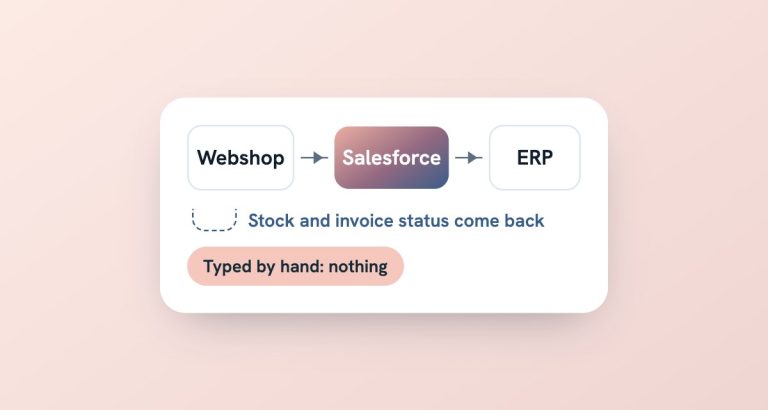
Orders, invoices and stock can move in both directions, so both sides stay in sync.
A second pair of eyes on someone else’s integration
Sometimes another team builds the integration. We can act as the external reviewer: check that the design fits your Salesforce, follow the work as it happens and sign it off before it goes live.
Copying data between systems?
Tell us which systems are involved and what your team does by hand today. We’ll tell you whether an app will do or a custom integration is worth it.
What it looks like in practice
A company selling on Amazon found an AppExchange app for the job, but it was built around Salesforce Opportunities. Their orders ran through custom order management, so the app couldn’t follow the process. A custom integration could.
Another client’s custom-built webshop had no API at all, so we built the connection on both sides. And in a Business Central project, we designed the integration together with the client’s ERP partner. It still runs today.
Frequently asked questions
Is there an app for this already?
Sometimes. AppExchange apps work well when the need is clear-cut and built on standard Salesforce objects. When you use custom objects or your own order management, an app often doesn’t fit. We check before recommending custom work.
What if our system has no API?
Then we build one. We’ve connected a custom webshop with no API by developing both sides of the integration.
Do we need our own developers?
No. We can design and build the whole integration. If you have a development team, we can work with them, for example by taking the Salesforce side while they handle theirs.
Can you work with our ERP partner?
Yes. We regularly design integrations together with the partner on the other side, so both teams agree one design before anything is built.
What happens when one side changes?
Every integration we build is documented, so changes can be planned rather than discovered. Salesforce ships three major releases a year, and other systems change too. Under a support plan, we keep an eye on it and adapt the integration when needed.